

Impact also previously known as Impact Radius is global leader in cross marketing attribution. Impact enables digital brands and agencies to maximise their return of ad spend across digital, mobile and offline channels.
Project
Merchants needed a quick way to supply advertisers with their products and allow them to showcase their products in a store layout
Company
Impact
My Role
visual design
The Scope
Impact’s motto was to change the way advertisers and merchants manage media partnerships. Merchants needed a quick way to supply advertisers with their products and allow them to showcase their products in a store layout.
The Impact Store builder widget is a whole new approach to creating an online or mobile store on the go. Merchants can create and customize their store in minutes with no coding required. As part of its unique features, the widget allows them to add multiple products and join campaigns.
Creating a widget is a 3 step process:
Step 1 – Create a group
Step 2 – Customize the widget
Step 3 – Get the embed code
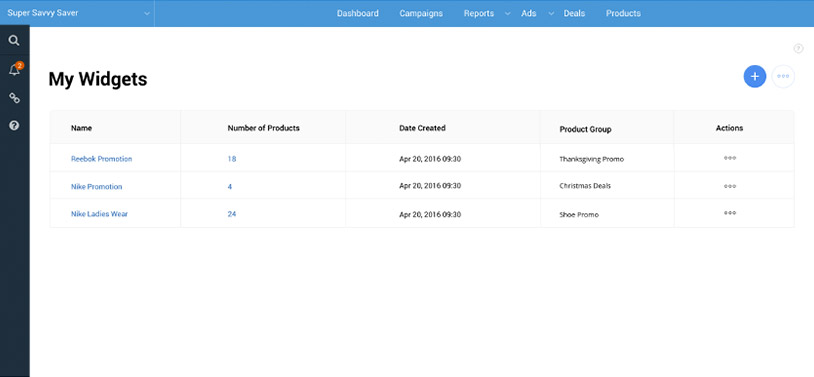
Widget listing
“My Widgets” list all the created widgets in a table format with the number of products, date created and the group associated with.
Create a widget
Merchant’s can create a widget to display in a grid or slideshow layout

Customize a widget
In the create flow, merchant’s can customize the widget.
The custom settings allow them to add a widget name, select an existing group of products or create a new group, select a grid with number of columns and rows or slideshow layout.

Customize widget – create group
Merchants can create a new group of products to add to their widget

Group created – success notification
When a group is created, merchants will get a success notification. They will now need to add products to that group that was created.

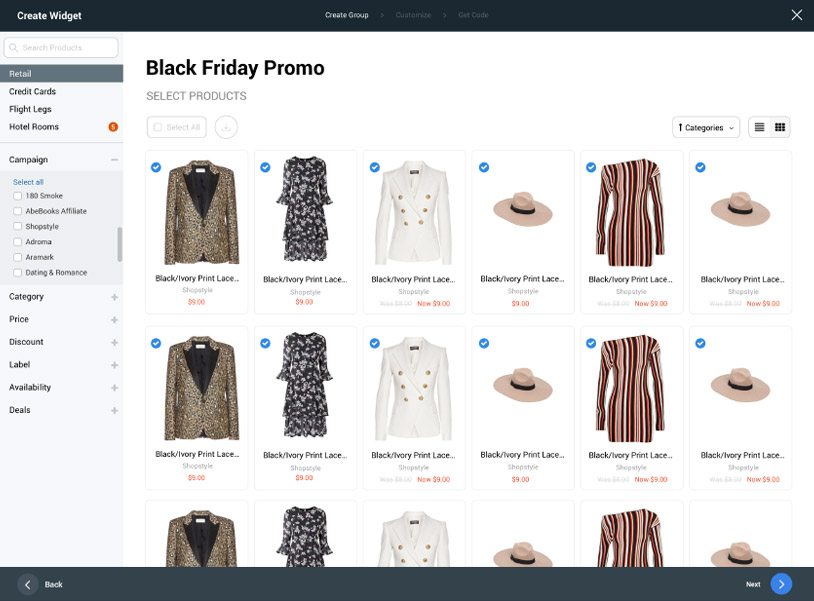
Select widget products
Merchants can select the products for their widget.
Select created group
With the product group setup, merchants can select the group. They also have a preview of the layout with products.

Get code
The next step after customizing their widget, merchants can get the code to embed on their website

Copy code
Code is copied to clipboard
